Setup
Detaching the back cover
Here's how to detach the back cover from the kaossilator 2 so that you can replace the batteries or insert and remove the memory card.
Detaching the cover
Press the lock button to release the back cover lock. Slide the kaossilator 2 toward yourself and separate it from the cover.
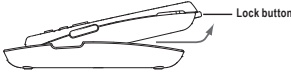
Attaching the cover
Fit the tabs of the back cover into the upper part of the kaossilator 2, and close the cover until you hear the lock button click.
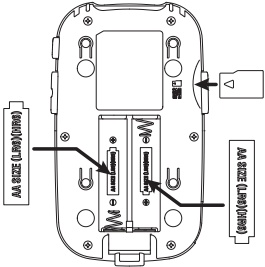
Replacing the batteries
The battery icon displays the remaining battery level. Install fresh batteries when the level runs low. Insert two AA batteries, making sure that they are oriented in the correct polarity.
Warning
Turn off the power before you replace the batteries.
Warning
The speaker volume will decrease according to the remaining battery level. When the batteries run low, it will not be possible to record to the memory card.
Warning
Unusable batteries should be removed immediately. You should also remove the batteries if you do not expect to be using the kaossilator 2 for an extended period of time.
Tip
Battery life will be extended if you enable the power conservation feature.
Tip
If you use nickel-metal hydride batteries, change the utility menu BATTERY TYPE setting to "Ni-MH."
Inserting or removing a memory card
You can use a memory card to record your performance, and to save or load data. You can also use the kaossilator 2 to play back audio files (WAV format) that you've copied from a computer.
- Make sure that the screen and all LEDs are unlit, and that the power is off.
- Insert the memory card into the slot until you hear it click into place.
- To remove the memory card, press it into the slot until you hear it click, and then release your finger.
- The memory card will pop out part-way, allowing you to pull it out.
Warning
When inserting a memory card, make sure that it is oriented correctly and that the correct side is facing upward, and insert it all the way into the slot, being careful not to use excessive force.
Warning
Do not insert or remove a memory card while the kaossilator 2 is powered-on. Doing so may damage the data in the kaossilator 2 or on the card, or it may render the memory card unusable.
Formatting
A memory card that has been previously used by a computer, a mobile phone, or a digital camera might not be immediately usable by the kaossilator 2 in that state. In order to use such a card, it must first be formatted by the kaossilator 2.
Warning
Formatting will erase the entire contents of the memory card.
Warning
Never turn off the power or remove the memory card while recording or formatting is taking place.
Memory cards that can be used
The kaossilator 2 can use 512 MByte–2 GByte microSD cards, and microSDHC cards up to 16 GBytes.
Tip
The kaossilator 2 cannot use SDXC cards.
Tip
For more details on recommended memory cards that are known to work with the kaossilator 2, please refer to the Korg website.
Memory card handling
Carefully read and observe the instructions that accompany your memory card.
Tip
A memory card is not included. You will need to purchase one separately.
Connections
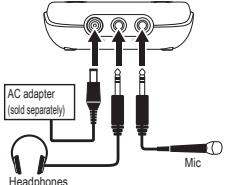
DC 4.5V jack
Connect the optional (separately sold) AC adapter here.
Warning
The power must be turned off when connecting the AC adapter.
Warning
Use only the specified AC adapter.
PHONES jack (stereo mini-jack)
You can connect headphones here.
MIC IN jack (stereo mini-jack)
You can connect an external mic here. When you connect a mic, an item on the display will appear, allowing you to enable or disable plug-in power. Choose the setting that's appropriate for the mic that you're using.
Specifications
Connectors
- MIC IN jack (Stereo ⅛" mini phone jack)
- PHONES jack (Stereo ⅛" mini phone jack)
- DC 4.5V jack
Power supply
Two AA batteries (alkaline or nickel-metal hydride batteries)
Battery life
Approximately five hours (POWER SAVING: ON with nickel-metal hydride batteries)
Dimensions (WxDxH)
76mm x 128mm x 25mm
Weight
100g / 3.53oz. (without batteries)
Included items
Owner's manual, two AA batteries
Options (sold separately)
AC adapter (center-positive 4.5V)